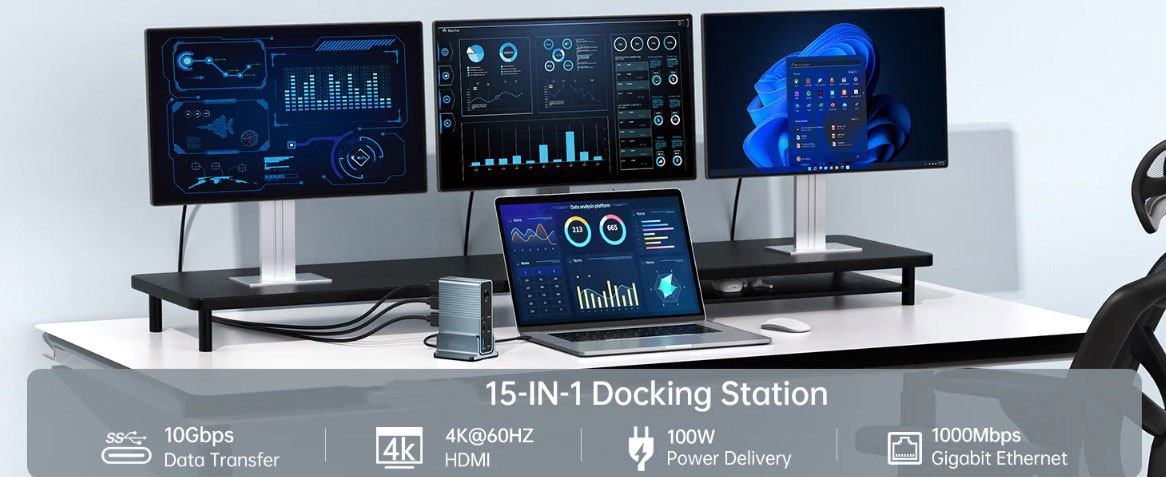
With technological advancements, an increasing number of devices are adopting USB-C ports, rendering USB-C adapters obsolete and making USB-C hubs a popular choice for connecting various devices due to their wider range of connectivity and greater flexibility. However, as the number of available ports on USB-C hubs increases, figuring out how to make full use of them becomes a challenge.
Whether you're a student looking to streamline your digital workflow or a teacher needing to add extra ports to your classroom, this article will provide you with practical tips and tutorials to help you fully leverage the advantages of USB-C hubs.
Understanding Port Types
To make the most of a USB-C hub, it's essential to first understand the types of ports it comes with. Common USB-C hubs are equipped with at least USB 3.0 (or USB 3.1) ports and HDMI ports, with some featuring USB-C power delivery ports and a few offering USB-C data ports that support data transfer speeds of up to 5-10Gbps. Depending on the model, you may also find additional ports such as Ethernet jacks or VGA adapters. Knowing about these port types will help you plan how to connect your devices for optimal results.
 |
15-in-1 PD 100W USB C Desktop Docking Station |
|
Specifications:
·Input Type Cx1(Connect to host)
·1xType C(PD3.0 with max 100W)
·1xHDMI(Max4K@30Hz)
·1xHDMI(Max4K@60Hz)
·1xDP(Max4K@60Hz
·1xRJ45 Gigabit Ethernet,10M/100M/1000M
·1xTF/Micro SD 3.0(Up to 104Mb/s)
·1xSD/MMC 3.0 (Up to 104Mb/s)
·1xAudio (3.5mm Audio&Mic
·2xType C 3.2(Max 10Gbps data transmission)
·3xUSB A 3.0(Max 5Gbps data transmission)
·Aluminum housing+ABS
|
Connecting Multiple Monitors
If your USB-C hub has an HDMI port, connecting an external monitor that supports HDMI becomes a breeze, significantly enhancing your productivity at home or in the office. However, it's crucial to ensure that all connected monitors support HDMI connectivity; otherwise, they won't display anything when plugged into the hub.
For users seeking 4K@60Hz ultra-high-definition video streaming, both the source and target devices must enable DP 1.4/Alt mode; otherwise, you'll be limited to 4K@30Hz, i.e., half the frame rate. It's worth noting that for USB-C phones like the Sam-sung S23 and LG models, achieving 4K@60Hz resolution through this method is not possible due to USB-C port limitations. Additionally, a DP 1.4 adapter allocates half of its data channels to USB-A 3.0 ports, resulting in reduced bandwidth.
Not all USB-C hubs support multi-monitor connections, so be sure to check the specifications before making a purchase. If your monitor has a DP port (with both DP input and output capabilities), you can easily add an extra monitor using a single DP-to-DP cable.
Leveraging Data Transfer Speeds
Compared to Micro USB or USB 2.0/USB 3.0, USB-C hubs excel in data transfer speeds. Most USB-C hubs on the market support at least USB 3.0 ports, ensuring basic needs are met even when purchasing blindly. If you're only using Bluetooth mice or keyboards, USB 2.0 ports will suffice, allowing you to reserve USB 3.0 ports for high-speed devices like USB flash drives, U-disks, or solid-state drives. (Although USB 3.1 ports typically feature a blue rubber identifier, some brands may omit it for design consistency.)
Some high-end USB-C hubs come equipped with Thunderbolt 4 ports, offering data transfer speeds of up to 40Gbps, four times faster than traditional USB 3.0. When connecting devices that require high-speed access, such as external hard drives, you can ensure fast and efficient large file transfers. However, it's important to note that these speeds are only available with Thunderbolt 4 or USB4 hubs, which are currently quite expensive.
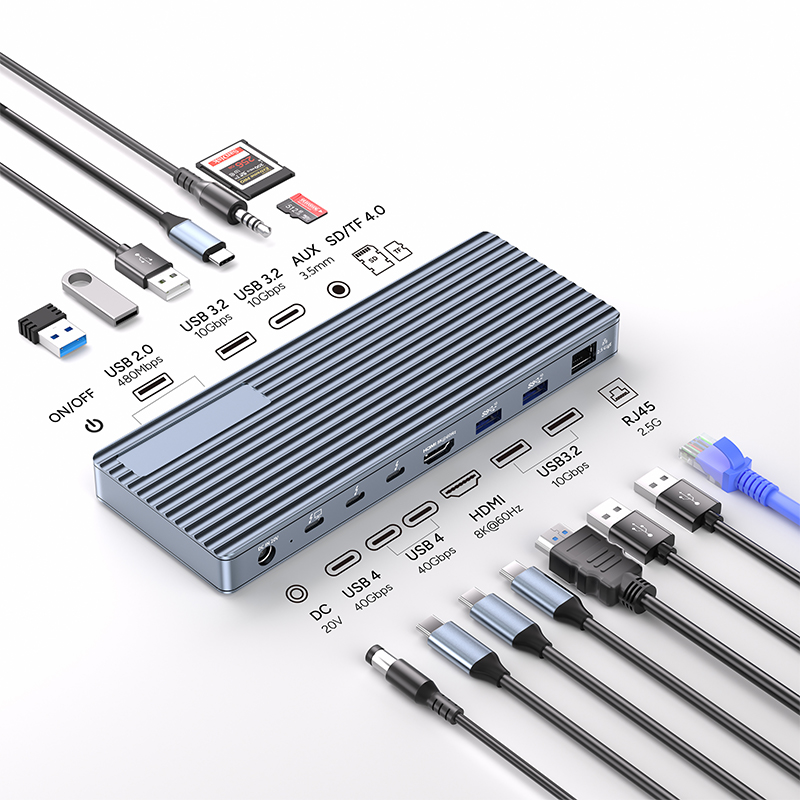 |
13 in 1 thunderbolt4 docking station |
|
Specifications:
Transfer Speed: 40Gbps (Compatible with USB4/3.2/3.1/3.0/2.0)
1x DC Power in 20V, Device host PD 85W
2xType C, TBT/USB4 40gbps interface downward compatibility
(Video output up to Single 8K@30Hz or Dual 4K@60Hz or
Three 4K@30Hz), power output up to 15W
1*HDMI 8K@60Hz video output
3* USB A 3.2 Gen2 (Max 10Gbps data transmission)
2xUSB A 2.0 (Max 480Mbps data transmission)
1xTF/Micro SD 3.0 ( Up to 104Mb/s)
1xSD/MMC 3.0 (Up to 104Mb/s)
1xAudio (3.5mm Audio&Mic )
1xRJ45 Gigabit Ethernet,10M/100M/1000M
Aluminum housing
|
No matter what devices you use, investing in a USB-C hub is a smart move to streamline your digital workflow. By understanding the port types on your hub, connecting multiple monitors when needed, and fully utilizing lightning-fast data transfer speeds, you can simplify and enhance your daily work in numerous ways while saving time and money in the long run.