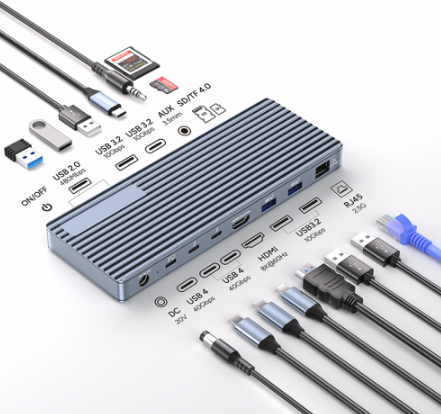
As is well known, laptops come with a limited number of ports, making it difficult to meet the demands of connecting multiple devices simultaneously. Docking stations effectively expand the number of ports on a laptop, allowing you to easily connect more peripherals while retaining the original USB ports. Integrating various interfaces such as LAN, USB, and HDMI, docking stations enable laptops to conveniently connect to large-screen monitors and various desktop devices, instantly transforming them into efficient workstations.
What is a Laptop Docking Station?
A docking station is a functional expansion device that significantly enhances a laptop's ability to connect to external devices. Please note that it differs from ordinary USB hubs, which typically offer fewer ports and limited functionality. Docking stations support the connection of various devices such as monitors, keyboards, printers, and external storage devices. While they may somewhat reduce the portability of the laptop, they greatly enhance its functionality and applicability.
How to Choose the Most Suitable Docking Station for You?
If you need a portable docking station, multiple functional features should be considered during selection. There is a wide variety of docking stations available on the market, with some models supporting hot-plugging and charging capabilities. When choosing, pay attention to key factors such as its size, types of interfaces, and device compatibility. It is recommended to review the product specifications in detail before purchasing to ensure the sele-cted docking station meets your actual needs.
Primary Application Scenarios of Docking Stations
Home and Office: Provide abundant interfaces, support multi-monitor connections, and connect various peripherals, effectively improving work efficiency and multitasking capabilities.
Gaming and Entertainment: By connecting to an external monitor, users can enjoy a clearer and smoother visual experience, making gaming more immersive.
Video Editing: Docking stations equipped with USB 3.0 and HDMI ports can connect devices such as keyboards, mice, hard drives, and dual monitors, delivering a smoother operation experience for tasks like video editing.
Detailed Introduction to Our 2025 Laptop Docking Statio
13-in-1 Thunderbolt 4 Laptop Docking Station
This docking station is equipped with a powerful Thunderbolt 4 interface, effortlessly expanding your setup to dual monitors.
It supports a single display with up to 8K@30Hz or dual 4K@60Hz output and can achieve ultra-high-resolution media display at 8K@60Hz via the HDMI interface.
Designed for users who require high-resolution displays, fast device charging, and high-speed NVMe SSD storage expansion, it is the ideal choice for those pursuing ultimate performance. The docking station supports up to 85W of PD protocol host charging power, providing stable power supply to high-performance laptops and ensuring devices can operate at full capacity even when multiple peripherals are connected.
This product offers a total transmission speed of up to 40Gbps (compatible with USB4/3.2/3.1/3.0/2.0) and features three 10Gbps USB-A 3.2 ports, two 480Mbps USB-A 2.0 ports, and TF/SD card reader slots with transmission speeds of up to 104MB/s, delivering an excellent data transfer experience for any device.
Additionally, this docking station includes a built-in 1000Mbps Gigabit RJ45 Ethernet port, providing stable and high-speed wired network connectivity to ensure uninterrupted internet access.