With its superior speed, rich display support, and enhanced charging capabilities, Thunderbolt 4 is the ideal choice for seamless device connectivity for work and play. While its core functionality is similar to Thunderbolt 3, Thunderbolt 4 introduces several key improvements to better meet evolving needs. Let's explore the unique advantages of Thunderbolt 4 hubs.
Core Functionality Upgrades to Meet Diverse Needs
Multi-Display Support Empowers Creativity and Gaming
A Thunderbolt 4 docking station is a versatile hub solution that supports multiple monitors, high-speed data transfer, and device charging. Its multi-display support is particularly valuable for creative professionals and gamers. It can connect up to two 4K monitors or one 8K monitor, providing ample screen real estate for creative work and visually intensive tasks like video editing and 3D modeling. Gamers can also create an immersive gaming platform, utilizing bandwidth to transfer massive amounts of graphics data for the highest resolution gaming experience and smooth performance.
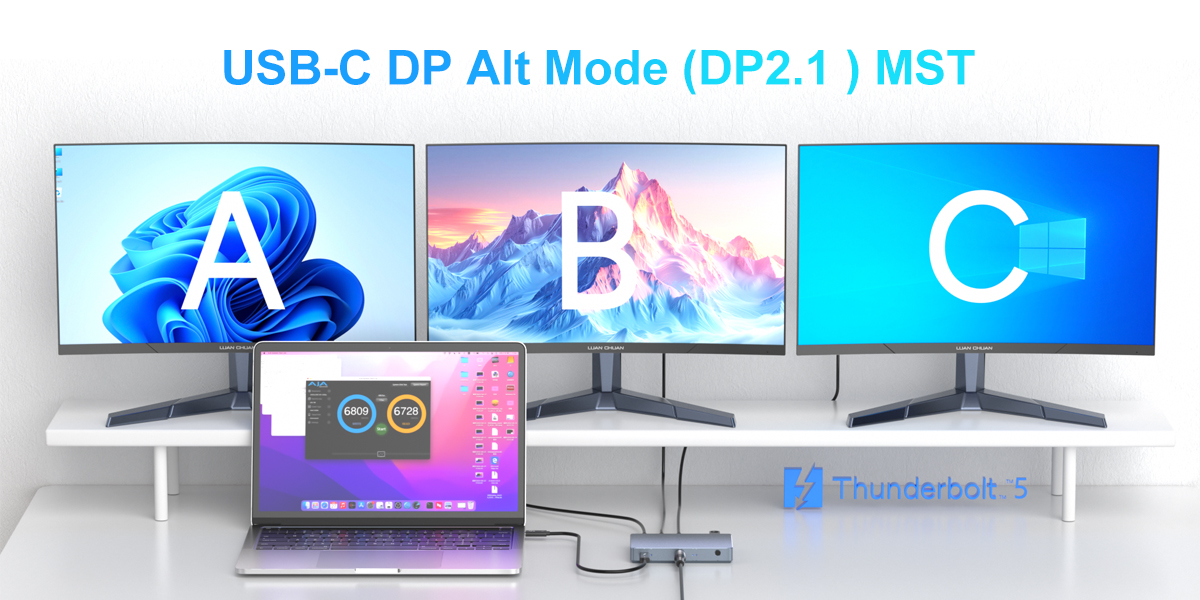
Specifically, creators can use two or three large, high-resolution displays to simultaneously view their entire timeline or project, leaving space for toolbars and editing panels, boosting productivity. As PC gaming resolutions continue to rise, with enthusiast-level devices moving toward 4K and even 8K, Thunderbolt 4 provides the necessary bandwidth and supports data transfer from high-speed storage devices and external GPUs. For esports players striving for extreme frame rates, Thunderbolt docks can achieve frame rates exceeding 60Hz on lower-resolution displays, delivering an unprecedentedly smooth experience and giving pros an advantage.
Compatibility with Legacy Devices, Seamless Integration and Upgrade
The Thunderbolt 4 dock offers backward compatibility with older Thunderbolt and USB-C devices, ensuring interoperability with existing Thunderbolt and USB-C devices. Users upgrading to a Thunderbolt 4 workstation or laptop can seamlessly migrate to the Thunderbolt 4 dock without purchasing new peripherals, saving costs. On the macOS side, it's compatible with all modern Macs equipped with a USB-C port. On the Windows side, all Thunderbolt 4 PCs are backwards compatible, and companies like Lenovo, HP, Dell, and Acer are selling Thunderbolt 4 laptops compatible with docks and devices.
Thanks to its backward compatibility, the TB4 hub can be used with a wide range of devices, including Thunderbolt 3 devices (external SSDs, 10GbE adapters, display adapters), USB4 devices, and USB-C devices (smartphones, tablets, webcams, audio interfaces, and those supporting DLTS mode). This flexibility ensures full interoperability with common port types, making it convenient for a diverse user base.
Powerful Charging, Manage Cable Clutter
High power output meets your device charging needs
A Thunderbolt 4 dock can charge your laptop and multiple devices simultaneously, making it an ideal choice for managing cable clutter. It provides up to 100W of power delivery, a 67% increase over Thunderbolt 3's 60W limit. This provides ample charging power for large laptops, mobile workstations, and other devices, while also powering other devices simultaneously. Today's thin and light laptops with discrete graphics cards and Ultrabooks with quad-core processors and brighter screens require higher power, and Thunderbolt 4's minimum 100W specification meets these charging needs. Tablets like the Microsoft Surface Pro 8 can also take advantage of its power delivery capabilities for fast charging without overheating. Manufacturers must support 100W power delivery when releasing Thunderbolt 4 computers and hardware, and users can look for the Thunderbolt logo to identify charging capabilities when purchasing.
Multiple-port charging simplifies cable management
In addition to charging laptops, Thunderbolt 4 guarantees a minimum of 15W of power delivery on each downstream port, allowing it to simultaneously charge common consumer electronics and computer accessories such as smartphones, tablets, and wireless headphones. Using a Thunderbolt dock eliminates the hassle of charging blocks and cables, centralizing charging and simplifying cable management, meeting the needs of users working from home or in hybrid workspaces to provide reliable power delivery to their device ecosystem.
Rich peripheral connectivity for an organized workspace
Support for a wide range of peripherals to meet professional needs
Professionals need to connect a variety of Thunderbolt and USB peripherals, including external storage, cameras, and audio equipment. Thunderbolt 4 docks support a wide range of peripherals, such as external hard drives, 4K cameras, and game controllers, through a single port. Its daisy-chaining functionality allows multiple devices to be connected via the dock's downstream port, reducing cable clutter. Any device compatible with Thunderbolt 3 or 4, USB4, or USB is fully compatible.
Users can connect external HDDs and SSDs, webcams, capture cards, graphics tablets, microphones and audio interfaces, MIDI instruments, game controllers, VR headsets, smart home hubs, and other common peripherals downstream of the Thunderbolt dock. Additionally, Thunderbolt supports 10Gb and 40Gb Ethernet adapters, making it ideal for ultra-fast file transfers on local networks. Video production teams can quickly transfer raw camera footage using a 10GbE-equipped Thunderbolt dock.
Reduce Cable Clutter, Boost Productivity
Port compatibility is especially important for creative professionals or technical workers. Connecting multiple SSDs provides ample storage for video projects, large monitors allow for easy connection and transfer of large amounts of data, and music producers can connect their plug-in devices for perfect sync and pristine sound quality. Gamers can connect their gaming gear directly through the dock, eliminating cable clutter.
Using Thunderbolt reduces cable clutter, eliminating cables around your laptop and keeping your workspace clutter-free. Thunderbolt 4 ensures ample bandwidth, ensuring that connecting multiple devices doesn't affect performance. An organized workspace brings both productivity and mental benefits, and reducing cable clutter is also beneficial for gamers, who can avoid tripping over cables or spilling drinks due to snaking VR headset cables.
High-speed data transfer and efficient storage
High-speed bandwidth meets the demands of professional production
Each generation of Thunderbolt has been driven by ever-increasing connection speeds. Thunderbolt 4 offers data transfer speeds of up to 40 Gbps, four times faster than USB's 10Gbps connection. Under optimal conditions, maximum speeds are achieved using a Thunderbolt 4 cable no longer than 3 meters (10 feet); even at a transmission distance of up to 6 meters, speeds of 20 Gbps are achieved, double the speed of Thunderbolt 3.
These real-world speeds enable professional-grade productions such as 4K, 6K, and 8K video editing, pristine high-resolution photo editing, multi-channel audio production, animation rendering, CAD project collaboration, code compilation, database analysis, and more. For data-intensive applications, Thunderbolt 4 provides ample bandwidth to significantly shorten project deadlines without performance issues.
Supports High-Speed Storage and Enhances Collaboration
For professionals who require fast, high-capacity storage solutions, Thunderbolt 4 docks support high-speed external SSDs and other storage devices, such as those using NVMe enclosures, multi-bay RAID drive enclosures, private cloud storage like NAS devices, and high-speed networks with 10/40 Gb Ethernet.
In creative workflows, Thunderbolt swiftly transfers data to high-speed external SSDs and continuously streams assets from high-capacity RAID arrays, significantly reducing project timelines. In collaborative environments, it enables direct access to shared storage from workstations for loading project files, assets, and libraries, seamlessly integrating with enterprise storage platforms and private cloud solutions. Connecting multiple storage devices via a Thunderbolt hub effectively eliminates bottlenecks, and expanding capacity is as simple as daisy-chaining additional external hard drives. This flexibility makes Thunderbolt ideal as creative projects grow in size.











