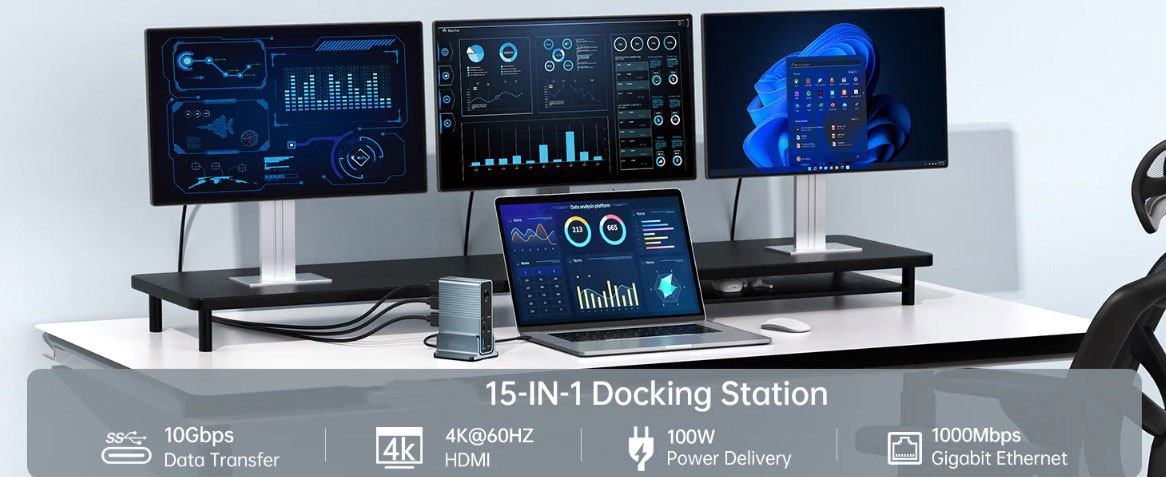
In the evolving tide of today's work patterns, remote work is gradually becoming the mainstream choice for many employees. This shift in work style has made efficient and reliable connectivity more crucial than ever before. And in the home office environment, the USB-C hub is undoubtedly a key device for establishing stable connections.
USB-C Hub: A Convenient Choice for Connecting Multiple Devices
The Universal Serial Bus Type-C connector (USB-C) is revolutionizing the way electronic devices are connected with an unstoppable momentum. This highly flexible connector is rapidly replacing other traditional connectors and becoming the de facto standard for numerous portable electronic devices. The USB-C hub cleverly utilizes this advanced connection method, integrating multiple ports into a compact device to enable simultaneous connection of multiple peripheral devices.
With a USB-C hub, users can easily connect their laptops to a multitude of devices through a single interface, including displays, input devices (such as keyboards and mice), and output devices like printers and scanners. Without a USB-C hub, the home office desktop would likely be cluttered with an excess of wires and adapters, not only looking messy but also seriously affecting work efficiency.
USB-C Hub: Simplifying Home Office Setup
Due to the often limited space in home offices and the large number of devices, organizing a home office to maximize work efficiency has become a challenge for many. The emergence of the USB-C hub has made this task much easier. It can centrally connect all necessary accessories, effectively avoiding a desktop cluttered with cables. Moreover, the compact size of the hub helps keep the desktop tidy and organized, thereby enhancing work efficiency.
To further ensure compatibility, USB-C hubs are usually equipped with a variety of port types, such as HDMI, DisplayPort, and Ethernet. This allows users to customize their work environment according to their needs, thus maximizing work efficiency.
The Significant Advantages of Compact Multi-Port USB-C Hubs
Compared to standard USB hubs, multi-port USB-C hubs offer numerous notable advantages. These space-saving gadgets are practically tailor-made for home offices with limited space. In addition, multi-port hubs allow users to connect multiple devices simultaneously, facilitating data transmission and charging for all connected devices at the same time.
With such a hub, users no longer need to worry about slow data transmission rates or low device battery levels. They can fully immerse themselves in their work because these hubs are usually capable of efficiently handling both data transmission and charging tasks simultaneously, making work smoother.
Specifications:
·Input Type Cx1(Connect to host)
·1xType C(PD3.0 with max 100W)
·1xHDMI(Max4K@30Hz)
·1xHDMI(Max4K@60Hz)
·1xDP(Max4K@60Hz
·1xRJ45 Gigabit Ethernet,10M/100M/1000M
·1xTF/Micro SD 3.0(Up to 104Mb/s)
·1xSD/MMC 3.0 (Up to 104Mb/s)
·1xAudio (3.5mm Audio&Mic
·2xType C 3.2(Max 10Gbps data transmission)
·3xUSB A 3.0(Max 5Gbps data transmission)
USB-C Adapters and Hubs: Solving Compatibility Issues
A prominent advantage of USB-C hubs is their ability to solve cross-device compatibility problems. As more and more devices adopt the USB-C connection type, hubs compatible with the USB-C standard are becoming increasingly important. USB-C hubs allow users to quickly and easily connect USB-C-supported devices to traditional peripherals equipped with other ports (such as USB-A, HDMI, and VGA).
This means that consumers don't need to replace a large number of devices. They can continue to use their existing equipment while also taking advantage of the latest technological developments, avoiding the hassle and cost of purchasing a large number of adapters due to device incompatibility.
Multi-Display Support: A Tool for Enhancing Efficiency and Productivity
Numerous studies and expert experiences have shown that multi-display support can significantly improve work efficiency. A common and practical feature of USB-C hubs is their ability to connect multiple displays to a single laptop.
Users can freely adjust the height of the displays and arrange them in a way that best suits their needs. This multi-display setup not only helps improve posture and reduce eye strain, making employees feel more relaxed and focused during long work hours, but also plays an important role in team collaboration. During meetings and discussions, employees can easily switch their attention from one task to another without interrupting their current main tasks, thus staying focused and efficient.
Ethernet-Based Network: A Stable Guarantee for Remote Work
In this era of widespread remote work, having a stable and reliable network connection is of utmost importance. As long as you have the right equipment and know how to use it, connecting to the network becomes a breeze. By accessing the Ethernet through a USB-C hub, users' video conferences, file transfers, and other online activities will be smoother and faster than when using Wi-Fi alone.
In addition, Ethernet access can significantly improve the security of remote workers. Because wired networks are less susceptible to network attacks than wireless networks. This is particularly important for professionals in fields where data security is of paramount importance, as it can effectively safeguard work data.
Charging Function: Highlighting the Versatility of USB-C Hubs
Another significant advantage of USB hubs is their ability to charge or power other devices. Users can use it to connect other devices and enjoy the convenience of wireless charging. This not only reduces cable clutter, making the desktop tidier, but also allows users to easily carry their devices with them without worrying about low battery levels.
How to Determine the Best USB-C Hub Option
If you are looking for an ideal USB-C hub, the following points must be kept in mind:
1、Check the Connection Ports: Always check the ports that the hub has according to your connection needs. If the hub has multiple connectors, including USB-A, HDMI, etc., it will be an ideal choice that can meet your needs for connecting various devices.
2、Focus on Transmission Speed: Choosing a hub with fast transmission speed can save you a lot of time and improve work efficiency.
3、Consider Durability: Select a hub made of durable materials to ensure its long-term reliable operation and reduce the inconvenience and cost caused by device damage.
4、Think About Size and Shape: Carefully consider the size and shape of the hub to ensure that it can perfectly fit into your existing home office setup without taking up too much space or causing inconvenience.
By comprehensively considering the above criteria, you will definitely be able to choose a USB-C hub that suits your needs and can significantly improve your home office efficiency.
Conclusion
If you work from home, the USB-C hub is undoubtedly an essential tool for enhancing work efficiency. These small yet powerful devices can easily connect multiple electronic devices, effectively solve compatibility issues, and support multi-display, Ethernet, and flexible power supply setups. If you want to maximize your work efficiency at home, take some time to carefully find the USB-C hub that best suits your needs and let it become your capable assistant in home office work.