Apple's MacBook, while boasting a unique charm in design, has an undeniable major flaw that seriously hinders users from pursuing a more efficient user experience. Jony Ive, Apple's former Chief Design Officer, was dedicated to creating thinner and lighter products. Although this concept has indeed led the design trend, Apple had to make a compromise to achieve this goal—sacrificing a crucial component: a rich set of interfaces.
Interface Dilemma: The Inherent Shortcoming of MacBook
The latest MacBook is equipped with only two USB C ports, which has brought a great deal of inconvenience to users. For those who frequently need to transfer data from SD cards or connect devices to projectors or external displays for presentations, this limitation is nothing short of a nightmare. The limited number of ports often leaves them in the embarrassing situation of "not having enough ports," forcing them to constantly plug and unplug devices, which significantly impacts work efficiency.
Technological Dawn: Integration of USB C Ports Brings a Turning Point
Fortunately, the technology industry has now become aware of this problem and has taken positive action to widely integrate USB C ports into most devices. This trend has brought good news to Mac users. By using a hub compatible with USB C ports, Mac users can finally enjoy the same convenience and advantages as non-Mac users.
Multi-Port Expansion: Unleashing the Potential of Computers
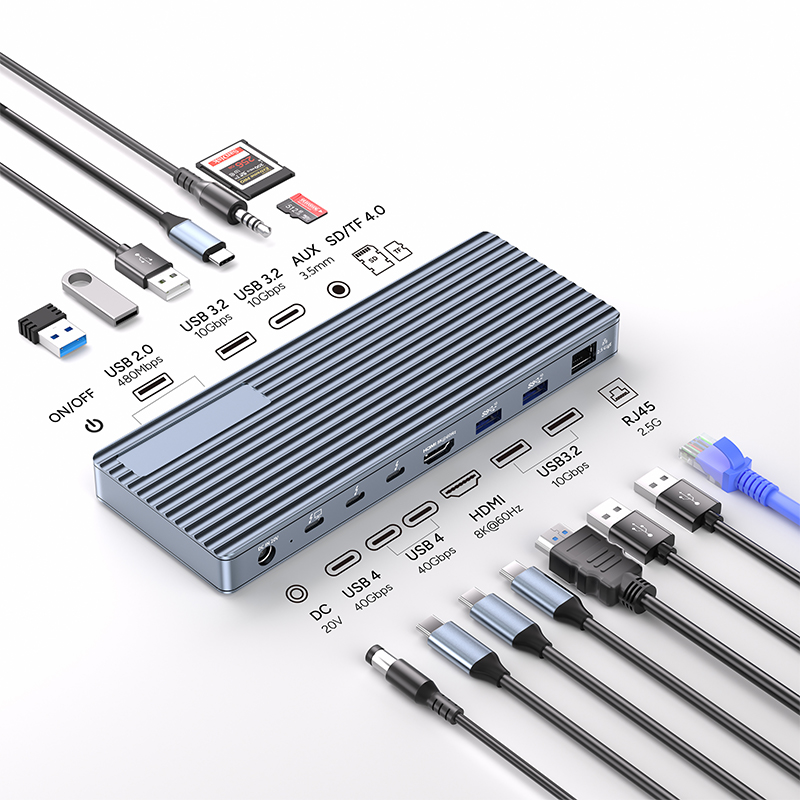
The USB C hub is a veritable lifesaver for addressing the port issues of MacBooks. It allows users to access multiple ports through a single, compact device, thereby maximizing the utilization of the computer's port resources. Common USB C hubs typically integrate various practical interfaces such as SD card readers, HDMI ports, and VGA ports. Moreover, these hubs are capable of multitasking, enabling them to handle multiple functions simultaneously and significantly enhancing the overall functionality of the Mac. Whether it's connecting an external hard drive for data storage, a printer for file printing, or a game controller for gaming enjoyment, the USB C hub can handle it all with ease.
Faster Data Transfer: A Leap in Speed Boosts Efficiency
Data transfer speed is a crucial indicator for measuring device performance, and it is often directly affected by the type of USB cable or hub used. USB 2 has a data transfer speed of only 480 Mbps, which can be excruciatingly slow when dealing with large amounts of data. In contrast, USB 3.2 boosts the data transfer speed to 5 Gbps, providing users with a more efficient data transfer experience. However, USB C outperforms them all. Not only is it compatible with most devices, but it also supports a data transfer speed of up to 10 Gbps.
For Mac users, this is undoubtedly a huge boon. By simply connecting a USB C hub, they can enjoy such high-speed data transfer. This means that users can transfer a movie file to their Mac in just one second, saving a significant amount of time. Additionally, if both the MacBook and the USB C hub support the faster Thunderbolt 3 connection, the data transfer speed can even reach an astonishing 40 Gbps, making data transfer as fast as lightning.
Efficient Power Delivery: Meeting Diverse Charging Needs
USB C hubs also excel in power delivery. The charge flow within the hub is precisely measured and optimized through advanced design, enabling it to provide high power to multiple devices and support fast charging. The PCB stack impedance of the hub is carefully calculated to effectively reduce crosstalk, ensuring that the current can better penetrate the power layer and that the components are tightly connected for stable and efficient current transmission.
These sophisticated designs and technologies allow USB C hubs to handle a power of up to 100 watts, enabling them to provide a larger charging capacity for power-hungry devices such as laptops. Moreover, their ability to support higher power also enables fast charging. In fact, hubs capable of handling higher power can charge devices 70% faster than standard cables that can only handle 5 watts of power. This means that users can fully charge their devices in a shorter time, eliminating the need for long waits and significantly improving the device's usability.
Additional Power Support: Enabling More Connections
Some Apple products require more power and cannot be directly connected to the MacBook. For example, when users try to connect an adapter or even an iPhone directly to the MacBook, they may encounter power shortage issues, preventing the devices from working properly. However, using a self-powered USB C hub as an "intermediary" between the MacBook and other Apple devices can easily solve this problem.
USB C hubs can be powered by their own batteries or power outlets, which means they can not only connect devices but also provide sufficient power to them simultaneously. If an Apple product requires a larger amount of power, the USB C hub can leverage its powerful power supply capability to provide stable power support to the product while also serving as a reliable connection between the two, ensuring smooth data transmission.
USB C hubs are undoubtedly excellent accessories for enhancing device performance. Connecting a compact USB C hub can not only enhance the device's functionality, accelerate data transfer and charging speeds, but also allow users to use more ports and provide stable power support for Mac accessories. If you're still troubled by the port issues of your MacBook, why not invest in a USB C hub immediately to break through the limitations of your MacBook and embark on a more efficient and convenient user experience?