What are USB-C hubs, docking stations, and converters?
How do you effectively connect multiple essential or auxiliary devices to your laptop with a single cable when your laptop doesn’t have enough ports? USB-C hubs, docking stations, and converters offer a solution to this problem.
Features and Benefits of USB-C Hubs
Modern laptops are sleeker and more portable, but often come with fewer ports. USB-C hubs expand the number of ports you need to connect devices and peripherals. Hubs come in many varieties, including multi-port USB-C hubs that offer USB-A ports, Gigabit Ethernet, HDMI, or SD connections. USB-C hubs are more portable than standard-sized docking stations and are suitable for any occasion, not just remote work or entertainment. They are an affordable and space-saving solution for your laptop, PC, or gaming system, allowing you to connect additional monitors and other devices as needed.
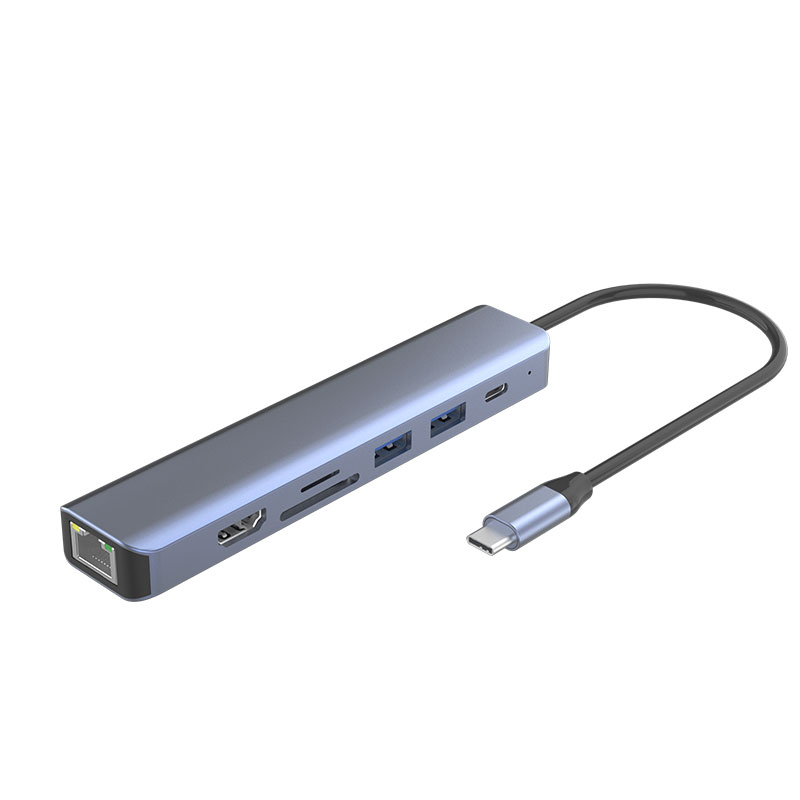
Docking stations provide convenience for office workers, remote workers, freelancers and others who need to set up a fully functional fixed workstation. USB-C docking stations are equipped with ports that support external hard drives, microphones, keyboards, multiple monitors and SD card readers. Simply connect your laptop to the docking station and you can connect all the devices you need. Some docking stations also have power pass-through capabilities and come with a power supply unit (PSU) that can charge the laptop while connected, eliminating the need to carry an additional charger. In addition, there are also mountable docking station options to save desk space and improve security.
USB-C Adapter Features and Benefits
Newer laptops have fewer ports, limiting the connection to older devices such as projectors, monitors or USB flash drives. Portable USB-C adapters provide additional ports, bridging the gap between new and old technology devices, and simply and effectively expanding the number of ports to increase productivity. Available models include USB-C adapters that provide secure wired networking, and adapters with USB-C port power, eliminating the need to find a separate power source to charge the connected device.
Differences between USB-C hubs, docking stations and converters
Although these three tools solve similar problems, each has unique features:
USB-C hubs: Small and easy to carry, plug and play, and can choose the type of port according to needs. It is an affordable choice for expanding ports, building a basic workstation, and working anytime, anywhere.
USB-C docking station: Provides multiple ports for fixed workstations, including HDMI/DisplayPort/VGA input, Gigabit Ethernet, SD card reader and more USB ports, while charging laptops through a single cable, providing flexibility and helping companies save money.
USB-C converters: Bridge the gap between new and old technology devices, such as USB-C to USB converters, USB-C to HDMI converters, USB-C to Ethernet converters, etc.
When do you need to buy a USB-C hub, docking station or converter?
USB-C hubs or multi-port converters: They are ideal for quickly connecting more devices when your productivity is limited by insufficient laptop ports or when you need to provide solutions for remote work teams.
USB-C docking station: If you want to set up a stationary workstation on your work surface that provides multiple ports and can charge your laptop with a single cable, a docking station is your best choice.
How to choose the right USB-C hub, docking station or converter?
When choosing the right tool, consider the following factors:
Devices to connect: Determine all the devices you need to connect, including keyboards, mice, microSD cards, external hard drives, USB-A devices, etc., and choose the corresponding port type.
Power requirements: Determine whether you need to power plugged-in devices or use the USB-A ports for fast charging to determine whether power pass-through is required.
Displays: Determine the number of displays you need to use and their connection type (HDMI, DisplayPort, VGA), and consider compatibility and resolution requirements.
Hardware compatibility: Understand the main port interface of your laptop (Thunderbolt or USB-C), as well as operating system compatibility to ensure that you choose the right model.
Speed: Make sure the hub or converter will not slow down data transfer speeds.
Size: Choose the right size and weight based on the usage scenario (such as a fixed workstation or carry-on).
By considering the above factors, you will be able to choose the USB-C hub, docking station or converter that best suits your needs.











