In the current digital age filled with a wide variety of devices, when faced with the need to connect numerous USB devices to a single machine, a USB hub becomes a powerful assistant for solving the problem of insufficient interfaces. However, before purchasing a rack-mounted device with 20 ports and starting the installation, there are still many crucial factors worthy of in-depth consideration. Next, let's explore the various styles of USB hubs on the market and their unique advantages together, helping you choose the ideal hub that meets your needs.
I. Diverse Installation Methods to Suit Different Scenarios
(1) Desktop Hubs: A Convenient Choice for Home Use
Desktop hubs are extremely common in home computer usage scenarios. It can be simply inserted into the computer and placed independently on the desktop. This type of hub is easy to operate and affordable. However, its drawback is that it can make the desktop cables crisscross and appear messy. For example, when you connect multiple devices such as a keyboard, mouse, printer, and USB flash drive, numerous cables are likely to tangle with each other, affecting the tidiness of the desktop.
(2) Surface-Mounted Hubs: A Stable Choice for Fixed Positions
Surface-mounted hubs are designed specifically for installation on flat surfaces. With minimal hardware, they can be firmly installed in a fixed position. However, compared with other types, once installed, it is more difficult to readjust the position later. For instance, in an office environment, if it is installed on the side of a desk to connect office equipment, if the desk layout is adjusted later, repositioning this hub will require a certain amount of manpower and time.
(3) DIN Rail Hubs: Convenient Installation for Efficient Integration
DIN rail hubs do not require the installation of a complete rack. They can be easily clipped onto the rail for installation. When using the DIN rail installation method to install multiple devices, the devices can be arranged neatly, effectively reducing cable tangling. In the control cabinets of industrial automation production lines, DIN rail hubs are often used to connect various sensors, controllers, and other devices, making the wiring simple and clear, and facilitating maintenance and management.
(4) Rack-Mounted Hubs: A Space-Optimized Solution for Large-Scale Device Management
Rack-mounted hubs are suitable for installation in standard 19-inch racks. When a large number of devices need to be installed, this type of hub can greatly save space. Moreover, the devices can be easily rearranged when necessary. Usually, a USB hub only occupies 1U size in the rack. Taking a data center as an example, a large number of servers need to be connected to various external devices. Rack-mounted hubs can efficiently integrate the connections of these devices, improving space utilization and management convenience.
II. Precisely Define Your Needs and Select the Appropriate Type
To accurately determine the type of hub that meets your operational needs, you can refer to the following key checklist:
(1) USB Protocol Selection: Keep Up with the Times
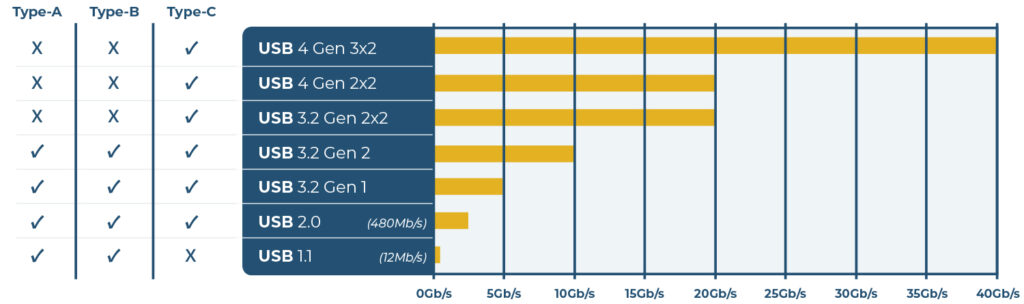
Currently, the common USB protocols on the market are mainly USB 2.0, 3.0, and 3.1. With the continuous development of technology, earlier versions are gradually being phased out. It is worth noting that each new version is fully compatible with earlier versions. For example, a USB 3.1 hub can communicate with a 2.0 device, but the data transfer rate will be limited to the 2.0 level. The speeds supported by each protocol are as follows:
USB 2.0: The maximum transfer rate is 480Mbps.
USB 3.0: The maximum can reach 5Gbps.
USB 3.1: It is divided into Gen 1 and Gen 2. The speed of Gen 1 is the same as that of 3.0, that is, the maximum is 5Gbps (SuperSpeed or SS); Gen 2 can provide a speed of 10Gbps (SuperSpeed+).
Compatibility is two-way. You can connect a USB 3.1 drive to a computer that only supports 2.0, or vice versa. Of course, in both cases, the data transfer speed can only reach the USB 2.0 standard. Therefore, in order to fully utilize the device performance, it is recommended that you purchase a hub whose supported protocol version is at least the same as that of the computer you are using.
(2) Connector Type Adaptation: Keep in Line with the Mainstream Trend
In the world of USB devices, there are a wide variety of connector types. Computers and hubs traditionally often use rectangular Type-A connectors, but it is notorious for being difficult to insert in the correct orien-tation on the first try. In contrast, the Type-C (i.e., USB-C) connector has obvious advantages. It has no issue of incorrect insertion, and its size is more compact (only 8.4 x 2.6 mm), and its unique round end is very easy to identify in appearance.
Although USB-C devices usually support the USB 3.1 protocol, this is not absolute. Therefore, when purchasing a device, be sure to carefully check the device specifications. It should be noted that the USB-C connector and cable are the same as those used by Thunderbolt 3. The Thunderbolt 3 port can also be used as a USB port. However, an ordinary USB-C port does not support the Thunderbolt function. In addition, the small trapezoidal connector commonly seen on many devices is Type-B, but hubs rarely or almost never use Type-B connectors.
(3) Port Quantity Planning: Meet the Device Connection Requirements
You need to determine the required number of ports according to the actual usage scenario. The most common number of ports on the market are 4, 7, 10, 12, 16, and 20. If you only connect a small number of devices such as a keyboard, mouse, and printer at home, a 4-port or 7-port hub may be able to meet your needs. However, if you are in a studio or data center and need to connect a large number of external devices such as multiple USB flash drives, external hard drives, and external cameras, then a hub with more than 10 ports will be a more suitable choice.
(4) Consideration of Active/Passive Hubs: Ensure Device Power Supply
Active hubs are equipped with an independent power supply from a wall socket, which can ensure that all connected devices can obtain sufficient power to meet the needs of charging and normal operation. Passive hubs, on the other hand, rely on obtaining power from the computer, and their power supply is relatively limited. For example, low-power devices such as keyboards and mice can work properly on passive hubs, but for devices such as disk drives that rely on USB power supply, passive hubs may not be able to provide enough power, resulting in the device not being able to operate normally. In addition, some devices do not require additional power when directly inserted into the computer, but may require additional power when connected to a hub. Moreover, the more devices connected to the hub, the higher the power demand. Therefore, for rack-mounted hubs that support a large number of ports, it is more reliable to choose an active hub with a power supply.

(5) Isolation Protection Needs: Protect Device Safety
Sometimes, peripheral devices may malfunction. For example, a short circuit may occur, and then overvoltage is transmitted to the connected devices, which is very likely to cause serious damage to the hub or computer. Hubs with surge protection functions can effectively prevent such events from occurring. Among all protection measures, optical isolation is the best choice. There is a gap inside this type of hub, and data passes through the gap in an optical form rather than an electrical form. As long as the overvoltage is not high enough to form an arc across the gap (usually it needs to withstand thousands of volts), any overvoltage can be prevented from damaging the device. In addition, hubs with a sturdy metal casing and isolation layer are not only durable and can withstand a certain degree of rough handling but can also continue to work stably in complex environments for many years.
We provide industrial-grade hubs suitable for USB 2.0, USB 3.0, USB 3.1 (Type-A), and USB-C. No matter what industry you are in or what kind of usage scenario you are facing, you can find high-quality products that meet your needs here.