What is a USB Hub?
A USB hub is an essential device in modern technology, providing connectivity and increased functionality to computers, smartphones, tablets, and game consoles. It expands the number of available ports on any one device, allowing a user to plug multiple USB devices into one port and get the benefits of having multiple physical ports from only one connection. Some people may wonder do USB hubs add latency. Actually, you probably can’t notice a big difference even if multiple devices may add latency.
2 Types of USB Hubs - powered and Unpowered
USB hubs come in two different forms. They include powered and unpowered. Let’s look at their different features and functions:
Powered USB Hubs
These USB hubs are usually plugged into the main source of electricity. They come with an in-built AC adapter which provides power to the external devices plugged into them. Powered USB Hubs are powerful enough to connect or power multiple high-voltage demanding devices like printers, scanners, and external hard drives. It’s especially helpful at workplaces, where there are many workloads and devices to work with. However, these powered USB hubs actually cost a lot more when compared to their unpowered counterparts, but it is fair since it provides more power. They also need access to a main socket so that leaves you hoping there’s a power source or socket close by, in order to use them with other devices.
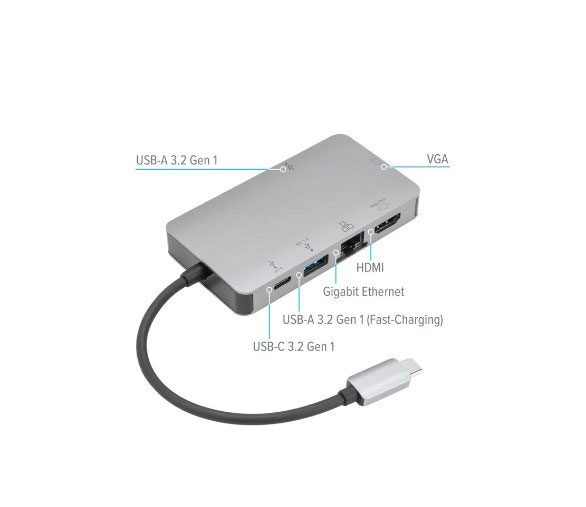
An unpowered USB hub is a device that allows multiple USB devices to be connected to a single USB port on a computer or other device. This USB hub doesn’t have its own power source like the powered USB hub. Rather, it relies on the power generated by the computer or device it is connected to. For this reason, there are limited types of devices that can be used with the unpowered USB hub. It mainly accommodates low-voltage demanding devices like smartphones, keyboards, flash drives, and game controllers. However, the unpowered USB hub is cheaper when compared to the powered USB hub. They also come in handy when you’re traveling or in a place where you can’t access power.
Benefits of Having a USB Hub
Powered or unpowered, USB hubs are lifesavers, and here’s why.
Improve Data Sharing
It would have been such an arduous task connecting peripheral devices that work hand in hand with your computers at the same time. And that’s where USB hubs come in. Hubs like Anker USBC hub make it easier to connect to and transfer data between these devices.
Improve Workstation
It would be outrageous to think of how creators in our time would have coped with managing all devices they use in producing content. Music artists, for instance, have studios with heavy-duty workstations. Sometimes for smooth production, you need to connect a webcam, recorder, and scanner at the same time. The workstation computers may not have enough ports to carry all at once, hence the need for USB hubs.
Easy to Gaming
Most gamers prefer using gaming laptops to a desktop, especially for the ease of carrying them around. However, these gaming laptops do not have as many ports as possible. A USB hub provides a port for connecting other gaming accessories like the gaming keypad, headsets, and other devices used in playing a game.
Convenient Data Storage
A USB hub for laptops allows you to connect multiple storage devices to your laptop at the same time. That way, you can easily send files to different storage devices without unplugging or re-plugging them into your computer. Aside from that, some USB hubs come with in-built card readers that help you to transfer data seamlessly from your memory card, not your computer.
How to Use a USB Hub
So you just bought a USB hub and you’re wondering, how does a USB hub work? The process is a simple one.First, plug its AC adapter into a main power source (that is if you are using a powered USB Hub )Plug the hub into your computer through the USB cable that comes with it. Now, connect your devices to the USB ports on the hub. Once the devices are connected to the USB hub, it’s quickly recognized by your computer and ready to use.










